
Download the IT Equipment Depreciation Calculator for Excel
Download the IT Equipment Depreciation Calculator for Excel from ITAMG to plan the retirement of business IT hardware. ITAMG's workbook helps you project book value and compare disposal dates using your costs, finance assumptions and quote evidence. Use it for laptops, desktop computers, servers, storage and networking equipment.
Complete the short form to unlock the blank Excel calculator, worked example and PDF guide in the download section.
XLSX · 2.98 MB · Workbook v1.2 · Macro-free
Prefer to calculate here first? Use the online IT equipment calculator.
IT Asset Management Group (ITAMG)
Download the IT Equipment Depreciation Calculator
Enter your contact details to unlock the IT equipment calculator, worked example and PDF guide here.
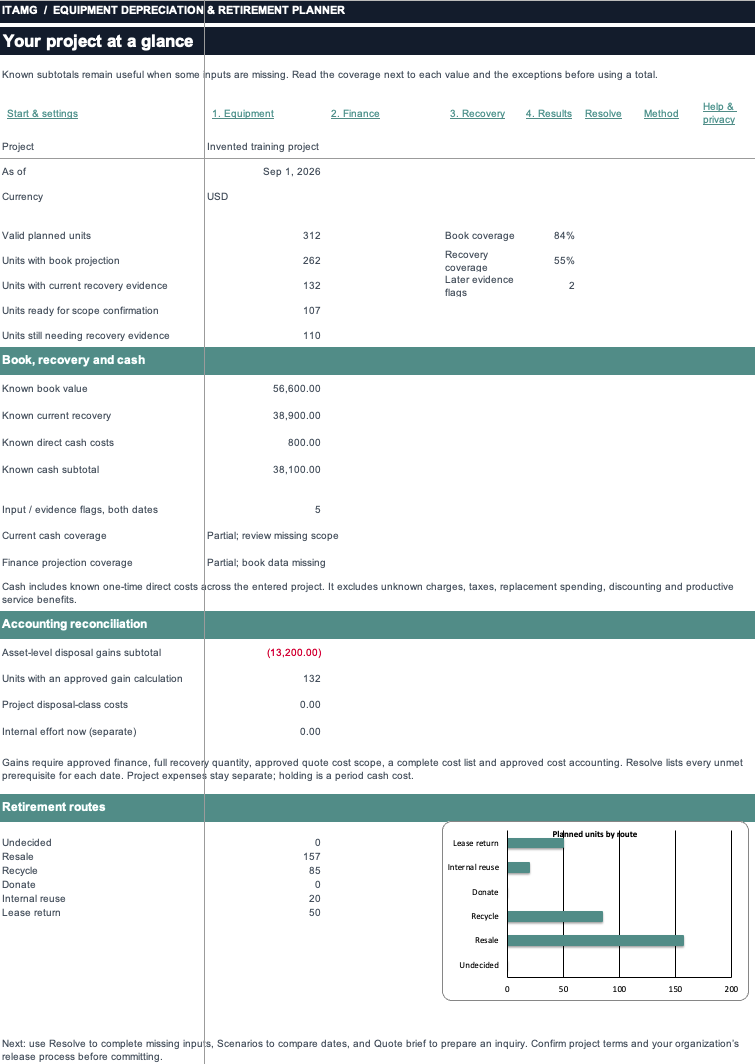
IT equipment dashboard: invented project totals
Get the Excel Calculator
All fields are required.
Your IT equipment downloads are ready
Start with the blank Excel calculator. The invented example and PDF guide are optional learning aids.
Access stays open in this browser for 30 minutes. If it expires, complete the form again.
Preview the IT equipment depreciation workbook
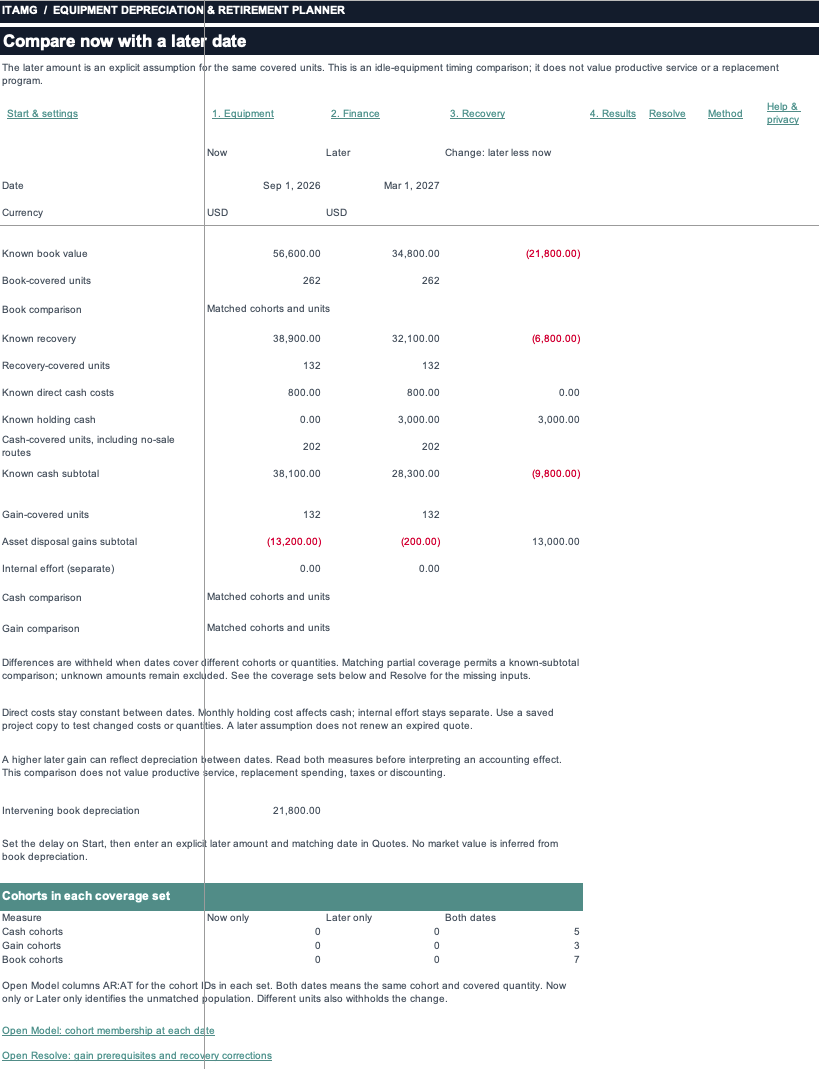
These Excel previews show the worked example with invented IT equipment data. The blank workbook has empty portfolio tables. Preview the layout here, then complete the download form to get the files.
What’s included in the IT equipment calculator download
Complete the download form above to unlock all three IT equipment planning files. Start with the blank Excel calculator for your project; use the invented example and PDF guide as optional learning aids.
Blank IT equipment calculator
The Excel workbook starts with empty IT equipment portfolio tables. Enter groups of laptops, computers, servers or other business IT hardware, then add your finance records, quotes and costs. Quick Calculator includes labeled training values; replace them before using its result.
The workbook supports up to 1,000 rows per input table. It includes current and later disposal comparisons, the Resolve worksheet for exceptions, a finance summary and a quote brief.
ITAMG-Retirement-Planner.xlsx
XLSX · 2.98 MB
Invented IT equipment example
Follow an invented IT equipment project through the workbook. See how inputs, quantities covered and unresolved evidence affect results. These figures are for learning, not an ITAMG quote, market benchmark or accounting recommendation.
Get the ExampleITAMG-Retirement-Planner-Worked-Example.xlsx
XLSX · 2.99 MB
IT equipment planner PDF guide
Use the PDF guide to set up the IT equipment workbook, enter project facts and interpret the results. It also explains what to review before sharing a workbook with colleagues.
Get the PDF GuideITAMG-Retirement-Planner-User-Guide.pdf
PDF · 25.3 KB
Set up your IT equipment plan in Excel
Start your IT equipment plan in the blank workbook. The separate invented example shows how the inputs and results fit together.
Save an IT project copy
Open the blank workbook in desktop Excel and save it under a project name. Set the project dates, delay, and currency on Start. If you use Quick Calculator, replace the labeled training inputs with your own whole-lot cost, whole-lot residual value, available-for-use date and useful life.
Group IT equipment with matching assumptions
Enter your IT equipment in the portfolio tables. Create separate groups when finance assumptions or condition differ. Record condition in Notes, and use approved finance balances or cost assumptions for each group.
Add quote and cost evidence
Enter quotes or clearly labeled estimates and identify charges already included in settlement. Keep missing evidence unknown. Enter zero only when zero has been confirmed, then compare the current and later dates you want to review.
Resolve gaps before sharing
Review Resolve and check the quantities covered by each result. Confirm finance assumptions and cost treatment with the responsible team. Review every sheet and note before sharing the workbook, finance summary, or quote brief.
Use the tested desktop Excel environment
Workbook v1.2 was tested in desktop Mac Excel 16.112.4. Windows Excel and other spreadsheet applications remain untested.
The XLSX workbook is macro-free. Its validation scope does not establish support for another version, Excel for the web, or another spreadsheet application.
Saving and sharing are your choices
The workbook has no built-in submission feature. Excel and your storage provider control saving and syncing, including OneDrive, SharePoint, and shared folders.
Sharing the whole workbook includes all sheets and notes. Formula protection is not encryption. Review the file before sharing it.
Choose the online IT calculator or Excel workbook
Use the online calculator for an IT equipment calculation or disposal comparison in your browser. Use the Excel workbook to save and share a project file. The two formats do not sync or transfer a complete plan.
| Planning task | Excel workbook | Online calculator |
|---|---|---|
| Enter IT equipment | Enter equipment groups in the portfolio tables. | Enter equipment groups manually or import a CSV. |
| Calculate book value | Use cost assumptions or approved opening balances, subject to the workbook's checks. | Use straight-line cost assumptions, approved opening balances or dated posted balances. |
| Compare disposal dates | Compare current and later results with matching quantities and evidence coverage. | Compare all planned equipment in a project containing only resale and recycling outcomes. |
| Save or share a plan | Save a workbook copy. Review all sheets and notes before sharing. | Inputs remain in the open page and clear when it closes or reloads. No plan export is available. |
| Move between formats | Enter finance records, quotes, costs and approvals in the workbook. | CSV import can add mapped equipment facts. It does not restore an Excel workbook. |
The Excel workbook displays amounts to two decimal places; the online calculator uses the displayed currency’s precision. Totals can differ from the sum of rounded rows. Neither format calculates tax, discounting or replacement benefits.
Use the online IT equipment calculator to calculate in your browser. For an Excel file you can save, complete the download form.
Understand IT equipment book value and disposal cash
IT equipment book value follows your finance assumptions. Resale proceeds follow a quote or your own estimate. Review the quantities covered before treating a subtotal as a project result.
Book value follows finance assumptions
The cost-based projection uses your cost, residual value, approved useful life, and dates. It follows a disclosed whole-anniversary-month convention and stops at residual. Approved opening balances follow the workbook's finance-parent and chronology checks.
The equipment category does not determine a depreciation rate. Use the useful life and accounting treatment approved for your organization.
Cash follows quotes and charges
Quoted proceeds or your own labeled estimate provide the recovery evidence. Check gross or net settlement terms and charges already included, so costs are counted once. Review current and later cash subtotals with their stated coverage.
Coverage controls interpretation
Unknown means evidence is missing; zero means you confirmed zero. Matching partial coverage still leaves a comparison incomplete. Planning gain or loss requires eligible equipment, finance approval, full recovery quantity, and reviewed costs and accounting.
The workbook helps you plan IT equipment retirement. It is not a tax calculator, periodic depreciation schedule generator or full fixed-asset register. For the calculation method and source references, see how the IT equipment calculator works.
IT equipment Excel download questions
Why does the blank workbook contain numbers?
The blank IT equipment workbook has empty portfolio input tables, while Quick Calculator contains labeled training values. Replace those values before using a result for your own hardware. The separate worked example contains invented project data for learning.
Can I use this as a computer depreciation calculator in Excel?
ITAMG's Excel workbook projects book value for business computers, laptops, servers and other IT hardware using your approved finance assumptions. Group units only when those assumptions match. The workbook does not supply a standard computer depreciation rate or a market resale price.
Can I move an online plan into the Excel workbook?
The online IT equipment calculator and Excel workbook do not transfer a complete plan. The online tool accepts a CSV of mapped equipment facts. Enter finance records, quotes, costs and approvals separately in the format you choose.
What happens when I submit the download form?
ITAMG receives the first name, last name, company name, email and phone number you enter. Successful submission unlocks the blank Excel calculator, worked example and PDF guide in the download section. Your calculator inputs are not submitted, and the workbook has no built-in feature that sends its contents to ITAMG.
Download your IT equipment planning workbook
Complete the short download form to get the Excel calculator for your IT equipment project. The invented example and PDF guide are included.
Request an IT Disposal Quote
Tell ITAMG about the business IT equipment you need to retire.
ITAMG services for retiring business IT equipment
ITAMG provides IT equipment buyback, IT asset disposition, data destruction, data center decommissioning and computer recycling. Choose the service that matches your hardware and disposal requirements, or use the guides to understand valuation and quote terms.
Sell Used IT Equipment
Recover value from retired servers, storage, and networking hardware.
IT Asset Disposition
Secure, certified ITAD for enterprise hardware retirement, with full chain of custody.
Data Destruction
On-site and off-site destruction to NIST 800-88, with serialized certificates.
Data Center Decommissioning
Equipment de-racking, secure removal, and documented custody for data center projects.
Computer Recycling
R2v3-certified recycling for hardware past resale, with documented downstream tracking.